Piping stdout and stderr to Preview

Piping stdout and stderr to Preview:

A while back, I wrote about how handy it was to redirect a man page into Preview. This allows you to keep the man page open, search it, and generally have a better user experience than struggling with more (or less) to navigate through the information provided there.

man -t apropos | open -fa Preview

Recently, someone asked me about more modern command line interaction, specifically, commands that use --help or similar to provide their documentation. Could that information be opened in Preview as well.

So I put on my thinking hat and set to work.

Git better with fzf and Fish

Git better with fzf and Fish:

You’ve probably heard me mention fzf before. It’s an amazing command line tool created by Junegunn Choi. It takes a list of data and turns it into a command line menu with fuzzy searching, multi-select, and can even preview each item in whatever way is appropriate. I’ve been using it in all kinds of scripts — where I used to have rudimentary numbered menus, I now have much friendlier and more flexible terminal navigation.

fzf is available via Homebrew, just run brew install fzf. See man fzf for very good documentation.

Adding the Kubernetes dashboard to Docker for Mac

A simple way to add the Kubernetes dashboard, which can be helpful to folks new to Kubernetes. Docker for Mac (edge) doesn’t ship with it in place. In your terminal type the following. I am assuming you have Kubernetes running and kubectl installed and on your path.

kubectl create -f https://raw.githubusercontent.com/kubernetes/dashboard/master/src/deploy/recommended/kubernetes-dashboard.yaml
kubectl get pods --namespace=kube-system

At this point you should see a line with a name that starts with “kubernetes-dashboard-” and some identifier. Modify the line below to match:

kubectl port-forward kubernetes-dashboard-7798c48646-wkgk4 8443:8443 -- namespace=kube-system &

Then your browser should load the dashboard on the port you specified (it will yell at you about the untrusted cert).

Just for clarity, the kubernetes-dashboard.yaml looks like the below as I write this, copied from the link above.

# Copyright 2017 The Kubernetes Authors.
#
# Licensed under the Apache License, Version 2.0 (the "License");
# you may not use this file except in compliance with the License.
# You may obtain a copy of the License at
#
#     http://www.apache.org/licenses/LICENSE-2.0
#
# Unless required by applicable law or agreed to in writing, software
# distributed under the License is distributed on an "AS IS" BASIS,
# WITHOUT WARRANTIES OR CONDITIONS OF ANY KIND, either express or implied.
# See the License for the specific language governing permissions and
# limitations under the License.

# Configuration to deploy release version of the Dashboard UI compatible with
# Kubernetes 1.8.
#
# Example usage: kubectl create -f 

# ------------------- Dashboard Secret ------------------- #

apiVersion: v1
kind: Secret
metadata:
  labels:
    k8s-app: kubernetes-dashboard
  name: kubernetes-dashboard-certs
  namespace: kube-system
type: Opaque

---
# ------------------- Dashboard Service Account ------------------- #

apiVersion: v1
kind: ServiceAccount
metadata:
  labels:
    k8s-app: kubernetes-dashboard
  name: kubernetes-dashboard
  namespace: kube-system

---
# ------------------- Dashboard Role & Role Binding ------------------- #

kind: Role
apiVersion: rbac.authorization.k8s.io/v1
metadata:
  name: kubernetes-dashboard-minimal
  namespace: kube-system
rules:
  # Allow Dashboard to create 'kubernetes-dashboard-key-holder' secret.
- apiGroups: [""]
  resources: ["secrets"]
  verbs: ["create"]
  # Allow Dashboard to create 'kubernetes-dashboard-settings' config map.
- apiGroups: [""]
  resources: ["configmaps"]
  verbs: ["create"]
  # Allow Dashboard to get, update and delete Dashboard exclusive secrets.
- apiGroups: [""]
  resources: ["secrets"]
  resourceNames: ["kubernetes-dashboard-key-holder", "kubernetes-dashboard-certs"]
  verbs: ["get", "update", "delete"]
  # Allow Dashboard to get and update 'kubernetes-dashboard-settings' config map.
- apiGroups: [""]
  resources: ["configmaps"]
  resourceNames: ["kubernetes-dashboard-settings"]
  verbs: ["get", "update"]
  # Allow Dashboard to get metrics from heapster.
- apiGroups: [""]
  resources: ["services"]
  resourceNames: ["heapster"]
  verbs: ["proxy"]
- apiGroups: [""]
  resources: ["services/proxy"]
  resourceNames: ["heapster", "http:heapster:", "https:heapster:"]
  verbs: ["get"]

---
apiVersion: rbac.authorization.k8s.io/v1
kind: RoleBinding
metadata:
  name: kubernetes-dashboard-minimal
  namespace: kube-system
roleRef:
  apiGroup: rbac.authorization.k8s.io
  kind: Role
  name: kubernetes-dashboard-minimal
subjects:
- kind: ServiceAccount
  name: kubernetes-dashboard
  namespace: kube-system

---
# ------------------- Dashboard Deployment ------------------- #

kind: Deployment
apiVersion: apps/v1beta2
metadata:
  labels:
    k8s-app: kubernetes-dashboard
  name: kubernetes-dashboard
  namespace: kube-system
spec:
  replicas: 1
  revisionHistoryLimit: 10
  selector:
    matchLabels:
      k8s-app: kubernetes-dashboard
  template:
    metadata:
      labels:
        k8s-app: kubernetes-dashboard
    spec:
      containers:
      - name: kubernetes-dashboard
        image: k8s.gcr.io/kubernetes-dashboard-amd64:v1.8.1
        ports:
        - containerPort: 8443
          protocol: TCP
        args:
          - --auto-generate-certificates
          # Uncomment the following line to manually specify Kubernetes API server Host
          # If not specified, Dashboard will attempt to auto discover the API server and connect
          # to it. Uncomment only if the default does not work.
          # - --apiserver-host=http://my-address:port
        volumeMounts:
        - name: kubernetes-dashboard-certs
          mountPath: /certs
          # Create on-disk volume to store exec logs
        - mountPath: /tmp
          name: tmp-volume
        livenessProbe:
          httpGet:
            scheme: HTTPS
            path: /
            port: 8443
          initialDelaySeconds: 30
          timeoutSeconds: 30
      volumes:
      - name: kubernetes-dashboard-certs
        secret:
          secretName: kubernetes-dashboard-certs
      - name: tmp-volume
        emptyDir: {}
      serviceAccountName: kubernetes-dashboard
      # Comment the following tolerations if Dashboard must not be deployed on master
      tolerations:
      - key: node-role.kubernetes.io/master
        effect: NoSchedule

---
# ------------------- Dashboard Service ------------------- #

kind: Service
apiVersion: v1
metadata:
  labels:
    k8s-app: kubernetes-dashboard
  name: kubernetes-dashboard
  namespace: kube-system
spec:
  ports:
    - port: 443
      targetPort: 8443
  selector:
    k8s-app: kubernetes-dashboard

And the news became important…

Dave Winer: RSS on the desktop, 15 years later

Distilled, in a tweet, this is what it’s about to me. “One of the most patriotic things you can do is to upgrade the quality and breadth of the news you read. Invest in your personal news flow.”

Even just a few months ago, that statement would have seemed arrogant, even unhinged. But today we know that control of information flow is essential to basically everything. It will be even more so in the future.

That’s the anthem of my new product, Electric River. It’s now available for the Mac, hopefully soon on other desktop platforms. It boots up reading the feeds I set it up to read. But you can and should make it your own. I want to work on making feed discovery better next, but for right now, you can build your own news network and you don’t have to be a rocket scientist to make it work.

[Dave’s vision for this has been clear for very long time, but is as fresh as ever. So, if you’re reading this, and you’ve been actively seeking and sharing stories in places like Facebook, do yourself a favor and try this out. Seek the news feeds that you find important and add them in. Most of all, continue to seek the truth that lies beneath the reporting, editing, and biases.]

Some comments on The Anarchist’s Design Book

Some comments on The Anarchist’s Design Book:

Which brings me to my final point. Schwarz has been one of my favorite go-to writers for matters of technique for well over a decade. With this book, (and to be honest, this really snuck up on me) he’s also suddenly sitting as one of my favorite designers. These pieces are all based in historical research, and standing on the shoulders of centuries of other makers – but the results are, to my eye, most definitely his. I’ve been looking at iterations of the desk and chair above, both in photos and in person, for months now, and I think they’re some of my favorite designs of recent memory. And they’ve only gotten more appealing to me over time – which, to me, is the key hallmark of really good design.

[If you the read the piece I wrote on ratios it would be very easy to know all my interests intersect. Music, cooking, coding, baking, woodworking, photography, and others have a thread woven through them for me which I endeavor to exploit. The technical similarity makes for a warm welcome. And while ratios bring some rigor to the process, in the end they inform the process of design and composition and can be extracted from designs as well. A tool on the road to making a point that comes and goes like a barn swallow. The Anarchist’s Design Book. That’s aesthetic anarchy. Not the stuff that passes for anarchy in the news these days. You don’t have to build furniture or work with wood to be impacted by Schwarz’s books. It’s as much about eliminating consumerism, stewardship, and the cost of things. The tool chest in the first book in this series was a metaphor as much as a reality.

And if you love beautiful design rendered as tools, go convince Raney to sell you something. You won’t regret it.]

Generate HTML from a Folder of Markdown Files

Generate HTML from a Folder of Markdown Files:

I have some Markdown files that I’m editing and I wanted to generate a folder of HTML files. I looked around on my machine and was surprised I didn’t have anything at hand for that already.

So I wrote a script. I’m a Ruby novice, and it’s quite likely that my Ruby is weird in a dozen different ways. But the script still might be useful to you. (The script requires the RDiscount gem.)

[one of my faves is to turn those if/then statements into guard clauses:

so this: if extension == ‘.markdown’ then return true end

becomes

return true if extension == ‘.markdown’

Just a personal fave, nothing more. I find them easy to read.]

Source: inessential.com

On why nothing is simple about syncing

Vesper Sync Diary #1 – Syncing Tags:

If a note has tags like this…

tags: paris, packing, travel

…then it would be changed to look like this:

tags: packing, travel

The actual tag could remain in the database — it’s just that no notes would refer to it. In the case of tags, that’s the equivalent of deleting it.

And if you started using that tag again in the future, it would, correctly, appear just for new notes. It wouldn’t get resurrected for old notes, since those notes were changed to not refer to that tag.

Note

I’m still thinking about tags. I could change my mind (particularly if I think of a better way, or if someone tells me about a better way).

Much of the rest of syncing is conceptually nailed down. (Much of it was nailed down before I wrote the first line of Vesper code last February.) But things can change as theory meets code.

[What is simple to understand is that sync is never simple.]

Source: inessential.com

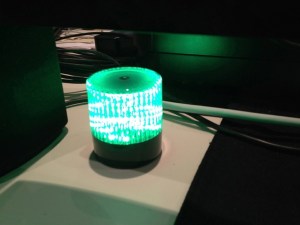
d: A build light

Build light

I have a long history with build lights. A build light is as indicator that displays the success or failure of a software “build” where all the parts are integrated, the tests run, and if all right all the tests pass and to the best of out test suites knowledge, everything is working.

It’s a confidence enhancer to be sure. The light just makes it obvious, and in fact, with my current team we have a number of indicators since we’re a virtual team. Test runs show in our group chat, are visible via ccmenu, and email. But nothing seems to bring as much joy as green build light. In one former place there was a build “bunny” a WiFi enabled device that would play some audio and move it’s ears, but it never seem to catch on as good indicator of the build.

I was looking for something to install with this group when I ran across this article. And while our setup is different, this seemed like an excellent start. Here’s how I wired it up:

There’s a gem called blinky. Blinky relies on libusb-compat, but that turned out to be only a “brew” away: brew install libusb-compat. And then gem install blinky. They’re designed around this usb powered light. They’re not far away in Portchester, NY. Nice. A few lines of code later, and my light was flashing on and off. It’s warning mode seems to be a little hinky, but everything else was perfect. A little parsing of the ccmenu xml that Tddium delivers, and I was off to the races. But I couldn’t afford one light per project just for myself so I decided on a pattern that would be obvious about a failure of any of the projects. Next I wanted things to run periodically. OS X uses launchd for stuff like this and here I ran into an issue.

I do lot of Ruby development, and use rbenv to switch between runtimes. And it works just fine. But in this case a standard call to ruby wouldn’t work because launched doesn’t know anything about my shell settings and so would try and run the system ruby which has nothing installed (no gems and it’s an old version I don’t often work with at this point). I couldn’t figure out how to get launchd to use a shell that would respect my settings.

In the end my launched command is sh -c /Users/daniel/buildlight/run.sh and in there is a line that points directly to the ruby executable I wanted to run with this file /Users/daniel/.rbenv/versions/1.9.2-p290/bin/ruby ~/buildlight/light.rb. That worked. While slightly inelegant… I’ll take “works” any day. And maybe someone else can explain to me how to make launchd respect rbenv. I use Lignon (app store) to control a number of things under launchd, and it makes it really painless to load stuff and set the params. And that’s it. Now every 5 minutes it checks the builds and lets me know what’s going on. I didn’t find a lot of articles about creating a build light when I looked, so I thought I would write this up. Happy coding…

Other folks I know are using this setup to display sales and other successes over the course of the day. It can be a great way to bring some celebration to the little wins that make up our days.

Every Little Things Capistrano Does Is Magic : Ruby Fleebie

Every Little Things Capistrano Does Is Magic : Ruby Fleebie:

During all these years, Capistrano has been for me a magical gnome that I invoke by saying “cap deploy, my magical friend!” and then I close my eyes, sing a happy song in my head and when the gnome has finished his magic, I hit F5 to see if all went well. And of course, if it didn’t, I blame the damn elf.

[Blame the elf! Blame the elf!]