AnandTech Tests New iPad Battery Life

AnandTech Tests New iPad Battery Life:

Anand Lal Shimpi:

Now for the killer. If you have an iPad on Verizon’s LTE network and
use it as a personal hotspot (not currently possible on the AT&T
version), it will last you roughly 25.3 hours on a single charge.
Obviously that’s with the display turned off, but with a 42.5Wh
battery driving Qualcomm’s MDM9600 you get tons of life out of the new
iPad as a personal hotspot.

[Nice. We’re I to get one, this would be a primary benefit.]

Source: Daring Fireball

How Apple.com will serve retina images to new iPads « Cloud Four

How Apple.com will serve retina images to new iPads « Cloud Four:

One of the more interesting questions raised by the new iPad and its retina display is whether or not web sites should deliver higher resolution images when there is no way to know the connection speed. AppleInsider found that Apple.com is being prepped to deliver high-res images and documented how you can test it in Safari on your desktop.

As you can imagine given my research on responsive images, I was keenly interested to see what approach Apple took.

What they’ve chose to do is load the regular images for the site and then if the device requesting the page is a new iPad with the retina display, they use javascript to replace the image with a high-res version of it.

[Oh boy. I’d carefully consider the importance of a hi-res image, take a careful look at my traffic stats, and go from there…]

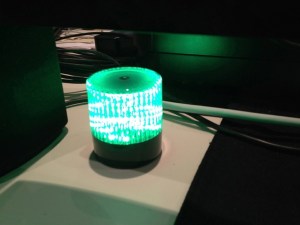
d: A build light

Build light

I have a long history with build lights. A build light is as indicator that displays the success or failure of a software “build” where all the parts are integrated, the tests run, and if all right all the tests pass and to the best of out test suites knowledge, everything is working.

It’s a confidence enhancer to be sure. The light just makes it obvious, and in fact, with my current team we have a number of indicators since we’re a virtual team. Test runs show in our group chat, are visible via ccmenu, and email. But nothing seems to bring as much joy as green build light. In one former place there was a build “bunny” a WiFi enabled device that would play some audio and move it’s ears, but it never seem to catch on as good indicator of the build.

I was looking for something to install with this group when I ran across this article. And while our setup is different, this seemed like an excellent start. Here’s how I wired it up:

There’s a gem called blinky. Blinky relies on libusb-compat, but that turned out to be only a “brew” away: brew install libusb-compat. And then gem install blinky. They’re designed around this usb powered light. They’re not far away in Portchester, NY. Nice. A few lines of code later, and my light was flashing on and off. It’s warning mode seems to be a little hinky, but everything else was perfect. A little parsing of the ccmenu xml that Tddium delivers, and I was off to the races. But I couldn’t afford one light per project just for myself so I decided on a pattern that would be obvious about a failure of any of the projects. Next I wanted things to run periodically. OS X uses launchd for stuff like this and here I ran into an issue.

I do lot of Ruby development, and use rbenv to switch between runtimes. And it works just fine. But in this case a standard call to ruby wouldn’t work because launched doesn’t know anything about my shell settings and so would try and run the system ruby which has nothing installed (no gems and it’s an old version I don’t often work with at this point). I couldn’t figure out how to get launchd to use a shell that would respect my settings.

In the end my launched command is sh -c /Users/daniel/buildlight/run.sh and in there is a line that points directly to the ruby executable I wanted to run with this file /Users/daniel/.rbenv/versions/1.9.2-p290/bin/ruby ~/buildlight/light.rb. That worked. While slightly inelegant… I’ll take “works” any day. And maybe someone else can explain to me how to make launchd respect rbenv. I use Lignon (app store) to control a number of things under launchd, and it makes it really painless to load stuff and set the params. And that’s it. Now every 5 minutes it checks the builds and lets me know what’s going on. I didn’t find a lot of articles about creating a build light when I looked, so I thought I would write this up. Happy coding…

Other folks I know are using this setup to display sales and other successes over the course of the day. It can be a great way to bring some celebration to the little wins that make up our days.

Twitter: The Modern Day Complaint Department – Shopify

Twitter: The Modern Day Complaint Department – Shopify:

Whether the complaints are justified or not, every online store can be a victim of public scorning on Twitter. As an ecommerce merchant you need to start thinking of Twitter as a public complaint department. The secret to running a successful Twitter complaint department is to give awesome customer service. Here’s where to start

[Nice way to think about it.]

Fast, easy, realtime metrics using Redis bitmaps «

Fast, easy, realtime metrics using Redis bitmaps «:

Redis backed bitmaps allow us to perform such calculations in realtime and are extremely space efficient. In a simulation of 128 million users, a typical metric such as “daily unique users” takes less than 50 ms on a MacBook Pro and only takes 16 MB of memory. Spool doesn’t have 128 million users yet but it’s nice to know our approach will scale. We thought we’d share how we do it, in case other startups find our approach useful.

[Interesting approach…]

Source:

Linting the hell out of your Ruby classes with Pelusa – Codegram

Linting the hell out of your Ruby classes with Pelusa – Codegram:

Pelusa (which is Spanish for the word lint) is a static analysis tool and framework to inspect your code style and notify you about possible red flags or missing best practices. Above all pelusa doesn’t run your code — it just analyzes it syntactically to gain superficial insights about it, and raise red flags when needed.

Although Pelusa needs Rubinius to run, due to how easy it is to work with a Ruby AST with it, it doesn’t mean that you have to run your application or Ruby code on Rubinius. Since it’s a static analysis tool, pelusa doesn’t care what your code runs on, it just looks at it and tells you stuff.

Managing Node.js Dependencies with Shrinkwrap « node blog

Managing Node.js Dependencies with Shrinkwrap « node blog:

Put differently, it’s understood that all software changes incur some risk, and it’s critical to be able to manage this risk on your own terms. Taking that risk in development is good because by definition that’s when you’re incorporating and testing software changes. On the other hand, if you’re shipping production software, you probably don’t want to take this risk when cutting a release candidate (i.e. build time) or when you actually ship (i.e. deploy time) because you want to validate whatever you ship.

You can address a simple case of this problem by only depending on specific versions of packages, allowing no semver flexibility at all, but this falls apart when you depend on packages that don’t also adopt the same principle. Many of us at Joyent started wondering: can we generalize this approach?