Scripting News: Echoes of 2002

Scripting News: Echoes of 2002:

So much has changed. There was no Twitter or Facebook in 2002. None of the writing systems we use now existed. I think RSS 2.0 even predates WordPress.#
I have found a way to make it much simpler and easier to evolve feeds on the web, and I’m not waiting for permission I’m just going ahead. That’s in fact what happened after RSS 2.0 with podcasting. We just did it, no one objected, and off we went.

[Curious!]

Apple previews innovative accessibility features – Apple

Apple previews innovative accessibility features – Apple:

Apple today previewed innovative software features that introduce new ways for users with disabilities to navigate, connect, and get the most out of Apple products. These powerful updates combine the company’s latest technologies to deliver unique and customizable tools for users, and build on Apple’s long-standing commitment to making products that work for everyone.

[One group that I don’t feel is classified as disabled is the elderly. As we age, things that were once easy and not requiring much through or intention become difficult to impossible. Part of the issue is the huge spread in ability as we age… there’s no easy single solution. But there is similarity to other stages of life and therefore we should be able to produce features that make it easier to manage the complexity of device life.

If anyone would like to work on some ideas in this area, I’d love to be involved. I’m looking at you Apple, but any Indy iOS devs are welcome!]

Scripting News: The Bose speaker review

Scripting News: The Bose speaker review:

I had to download their app just to turn it on, and then I had to create an account on their service. I also had to check off their agreement, which of course I didn’t read. So right off the bat, before it even says anything to me, I hate it.#

[I totally get that hatred. Bose makes some great sounding stuff, and I understand the BigCo product pipeline that leads to the desire to compete (Better Sound because Bose! Now with Alexa!) but the cost is too high in terms of privacy and design. And in case apparently in dollars too. I have owned Bose products for “daily driver” listening for 30 years… because they appreciated the need for quality sound in a small package.]

My iPhone Walk shortcut (NFC)

I’ve been walking for over six months on a daily basis, and it felt like it was time to automate the start of the routine. The shortcut looks like this:

IMG 2804

I hold my phone near the NFC tag and it vibrates the phone, starts the workout on my watch, and send a message to my wife letting her know I’m out the door.

I’ll test and tweak for a few days and then create another for the end of the walk. Update: Sadly there is no “end workout” event as of yet… that sucks.

20. Framing

20. Framing:

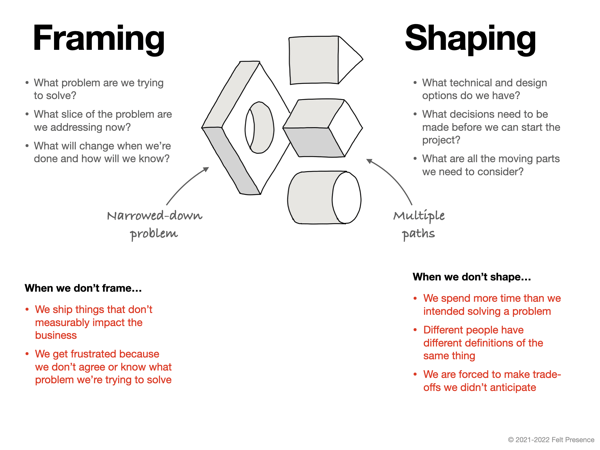
Which customer segment is affected? How valuable is this segment compared to the others? What other things are going on in the business that need our attention? You’ll sometimes see live SQL queries and people pulling up past customer research data in a framing session to answer a question or narrow down the opportunity.

The output of a framing session is a well-framed problem: something where the business says “if we can shape this into something doable and execute within X weeks, that will be meaningful to us.” There’s a commitment to spend time shaping, but not yet a commitment to go into a build cycle. That final bet still needs to be made based on how the shaping goes.

[A missing link to a great degree for many companies.]

Screen Shot 2022 03 23 at 2 00 31 PM

Apple’s Self Service Repair now available

Apple’s Self Service Repair now available:

The new online store offers more than 200 individual parts and tools, enabling customers who are experienced with the complexities of repairing electronic devices to complete repairs on the iPhone 12 and iPhone 13 lineups and iPhone SE (3rd generation), such as the display, battery, and camera. Later this year the program will also include manuals, parts, and tools to perform repairs on Mac computers with Apple silicon.

[Still checking this out, but maybe it’ll help savvy folks fix their phones.]

Last man standing – All this

Last man standing – All this:

The main problem with the man command is that it takes over your terminal window—you can’t refer to it while you’re constructing a command unless you open a second terminal window first or use the control-click trick. To get around this problem, I wrote a short shell script, called bman, that opens the man page in a new BBEdit window. Since I always have BBEdit running, this works just about as fast as the regular old man command.

[Nice idea.]

System Preferences Reimagined on macOS — Basic Apple Guy

System Preferences Reimagined on macOS — Basic Apple Guy:

As features have continued being added to macOS, Apple has opted to force new preferences inside existing ones to avoid icon overcrowding. Focus Mode on iOS is crammed into the new ‘Notifications & Focus’ tab on macOS, Night Shift is a tiny button on the bottom right under the Display settings, and the Control Centre is managed behind the ‘Dock & Menu Bar’ icon through a process of having the user individually click-through 15+ different tabs to customize their Menu Bar.

And while some settings are crammed together, others feel needlessly scattered. AppleID, Family Sharing, Internet Accounts, & Users & Groups are four different preference icons, while on iOS they are essentially all managed under a single tab. Showing the Bluetooth icon in the Menu Bar is done through the ‘Bluetooth’ settings, while changing the clock is done in the ‘Dock & Menu Bar’ settings, not the ‘Date & Time’ option.

[Yes. It’s truly a mess. I’m pretty confident that the designers at Apple know this but can’t get this work prioritized. It seems familiar and yet strange at a company of that scope and scale.]

∞ Apple Support: How to watch together on your Apple TV during a FaceTime call

∞ Apple Support: How to watch together on your Apple TV during a FaceTime call:

Another excellent Apple Support video. This one walks through the process of syncing your Apple TV watching experience with other folks on a FaceTime call.

Interesting that the Mac is not mentioned, even though SharePlay via FaceTime was introduced in macOS Monterey 12.1, as described here.

No matter, good to see the SharePlay process in action. Well done.

[Great vids!]

Source: The Loop